PrestaShop Guide
To create a custom module in PrestaShop 9 that uses the modern Symfony architecture (services, dependency injection), it is best to proceed in structured steps.
Here is the step-by-step guide on how to build a module named sentryformspam that performs the SentryForm spam check when submitting the contact form.
Module Folder Structure
Create a new folder named sentryformspam in the /modules/ directory of your PrestaShop installation with the following structure:
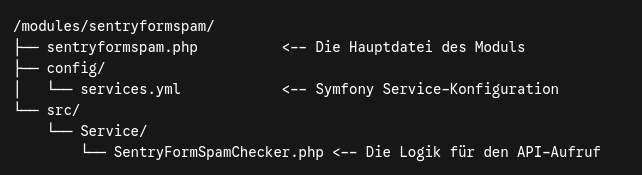
Step 1: Create the main file 'sentryformspam.php'
This file controls the installation, registration of hooks, and integrates the module into PrestaShop.
<?php


if (!defined('_PS_VERSION_')) {
    exit;
}

class SentryFormSpamName extends Module
{
    public function __construct()
    {
        $this->name = 'sentryformspam';
        $this->tab = 'front_office_features';
        $this->version = '1.0.0';
        $this->author = 'Dein Name';
        $this->need_instance = 0;
        $this->ps_versions_compliancy = [
            'min' => '9.0.0',
            'max' => '9.99.99',
        ];
        parent::__construct();

        $this->displayName = $this->trans('SentryForm Spam Protection', [], 'Modules.Sentryformspam.Admin');
        $this->description = $this->trans('Schützt das Kontaktformular vor Spam über SentryForm.', [], 'Modules.Sentryformspam.Admin');
    }

    public function install()
    {
        return parent::install() && $this->registerHook('actionContactFormSubmit');
    }

    public function uninstall()
    {
        return parent::uninstall();
    }

    /**
     * Dieser Hook greift beim Absenden des Standard-Kontaktformulars in PrestaShop
     */
    public function hookActionContactFormSubmit($params)
    {
        // Formulardaten abgreifen
        $request = Symfony\Component\HttpFoundation\Request::createFromGlobals();

        $senderEmail = $request->request->get('from');
        $messageText = $request->request->get('message');
        $subject = $request->request->get('message_title') ?? 'Kontaktformular-Anfrage';
        $recipientEmail = 'service@sebitec.net'; // Oder dynamisch aus Shop-Konfiguration

        // Den Service über den Symfony Container laden
        /** @var \SentryForm\Service\SentryFormSpamChecker $spamChecker */
        $container = $this->get('Symfony\Component\DependencyInjection\ContainerInterface');

        if ($container && $container->has('sentryform.spam_checker')) {
            $spamChecker = $container->get('sentryform.spam_checker');
            $isSpam = $spamChecker->check($senderEmail, $recipientEmail, $subject, $messageText);

            if ($isSpam) {
                // Zugriff auf das globale Kontakt-Controller-Objekt / Fehlerhandling
                // In PrestaShop fügt man Fehler i.d.R. dem Request/Controller hinzu oder bricht ab
                throw new \PrestaShopException('Ihre Nachricht wurde als Spam eingestuft und konnte nicht gesendet werden.');
            }
        }
    }
}
Step 2: The service configuration 'config/services.yml'
Here you tell Symfony to load your SpamChecker and automatically pass the native HTTP client.
services:
  _defaults:
    public: true

  sentryform.spam_checker:
    class: 'SentryForm\Service\SentryFormSpamChecker'
    arguments:
      - '@Symfony\Contracts\HttpClient\HttpClientInterface'
Step 3: Define the service class 'src/Service/SentryFormSpamChecker.php'
This is where the actual cURL or HTTP request to your SentryForm API takes place.
<?php


namespace SentryForm\Service;

use Symfony\Contracts\HttpClient\HttpClientInterface;

class SentryFormSpamChecker
{
    private HttpClientInterface $httpClient;
    private string $apiKey = 'Pxu78kBoHKLRYdkWzFYOClsQfnnRtHyRFvndyWeikXaciinl3Dj388Neh1bs'; // Dein API-Key

    public function __construct(HttpClientInterface $httpClient)
    {
        $this->httpClient = $httpClient;
    }

    public function check(string $sender, string $recipient, string $subject, string $message): bool
    {
        try {
            $response = $this->httpClient->request('POST', 'https://api.sentryform.online/api/v1/scan', [
                'headers' => [
                    'Accept' => 'application/json',
                    'Content-Type' => 'application/json',
                    'X-Spam-ApiKey' => $this->apiKey,
                    'X-Spam-Referer' => Tools::getShopDomain(false),
                ],
                'json' => [
                    'sender' => $sender,
                    'recipient' => $recipient,
                    'subject' => $subject,
                    'message' => $message,
                ],
            ]);

            $statusCode = $response->getStatusCode();
            $data = $response->toArray(false);

            // Wenn API 200 liefert und der Spam-Code 1 ist -> Spam erkannt!
            if ($statusCode === 200 && isset($data['code']) && $data['code'] === 1) {
                return true;
            }

        } catch (\Exception $e) {
            // Bei Netzwerkfehlern der API den Shop im Zweifel nicht blockieren (false zurückgeben)
            return false;
        }

        return false; // Kein Spam
    }
}
What's next?
- Upload the sentryformspam folder via FTP or via your Git deployment to the /modules/ directory of your PrestaShop 9.
- Go to Modules > Module Manager in the PrestaShop back office.
- Search for SentryForm Spam Protection and click Install.
As soon as a user submits the contact form, the actionContactFormSubmit hook intercepts it, sends the data to your API, and blocks sending if SentryForm triggers an alert.